
Scanova vs QR Tiger/GS1: Making Next-Gen Product Barcodes

For many years, the barcode scanned at checkout has done one main job. It identifies a product and retrieves its price.
That role is starting to expand.
As retailers prepare for GS1 Sunrise 2027, the goal is for their systems to scan and process GS1 2D barcodes. These barcodes can hold more product data than traditional 1D barcodes.
Some 2D barcodes store structured information using GS1 Element Strings. This allows details like batch numbers, expiration dates, or serial numbers to be captured during scanning. Many supply chains already use this method for tracking and traceability.
Another format gaining attention is GS1 Digital Link. It can contain the same identifiers and data used in element strings, but in a web-based format. This means the barcode can still work in supply chain systems, while also allowing a phone scan to open product information online.
Because of this, the same 2D barcode can serve different users. Supply chain teams can scan it to capture operational data. Shoppers can scan it to view product details, instructions, or safety information.
Many brands are already testing these new barcodes. The standards and guidelines come from GS1, while the tools used to generate and manage the codes can be built internally or provided by third-party platforms.
In this article, we compare two such platforms for generating GS1 Digital Link QR codes, also called QR codes powered by GS1: Scannova vs QR TIGER.
Scanova Overview
Scanova provides a versatile QR code generator that supports multiple use cases, including websites, documents, business cards, social media, and more. It allows creating both static and dynamic QR codes.
The platform offers customization options, ensuring QR codes align with brand identity. Its analytics dashboard tracks scan activity that allows measuring user engagement.
Here are its key features:
Dynamic QR Codes
Scanova allows users to create dynamic QR codes that can be edited even after printing. These codes are versatile for campaigns and long-term use.
QR Code Customization
The platform provides various customization options to make QR codes visually appealing and brand-aligned. Users can add logos, images, frames, and edit elements like color, eye patterns, and data patterns. This helps QR codes stand out in marketing materials while still being easy to scan.
Tracking & Analytics
The analytics dashboard shows details about each scan, like where it happened, what device and browser were used, and the time. This transforms QR codes into useful tools for tracking engagement to help businesses check their campaigns’ performance and make improvements based on real data.
Mobile Landing Pages
Scanova lets you create tailored mobile landing pages connected to QR codes. These pages can include videos, images, forms, or offers to give audiences a more engaging experience and help businesses capture leads.
Data Security
The platform follows international standards such as ISO/IEC 27001:2022 and GDPR & CCPA readiness to ensure the safe handling of your data.
How to create GS1 DL QR codes with Scanova?
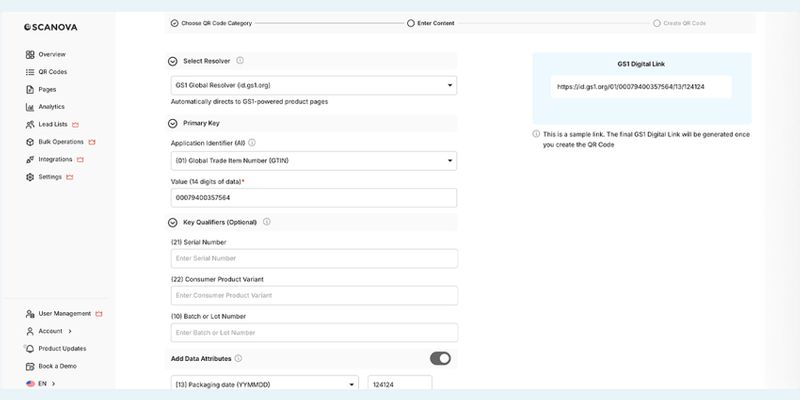
Note: This was tested using a free trial. The process and interface may have changed since then.
Step 1: Set Up Your Account
To get started, create an account on the platform and log in.Step 2: Create Your GS1 QR Code
At the top of the page, click Create QR Code and select GS1 QR Code.
Choose a Resolver: Select who will handle the QR code's link destination. You have four options: GS1 (the global standards organization), your own resolver (if you manage your own infrastructure), ScanNova (the platform's default), or a white-labeled resolver, a branded version of the default with your own identity.
Enter Your Product Data: Enter the required GTIN, then add any optional qualifiers or data attributes as needed, such as variant, batch, or serial number, along with attributes like expiry date or package type.
Set the Link Destination: If you selected ScanNova as your resolver, choose where the QR code will take the scanner: a webpage, a file or text, or a landing page you've already built within the platform.
Generate and Download: Click Create Code. Once generated, you can download it as-is or customize the QR code's visual design before saving and downloading.
QR Tiger/GS1 Overview
QR TIGER is a leading provider of affordable dynamic QR codes. Our goal is simple. Help businesses use QR codes in an easy, flexible, and cost-effective way.
Our solutions cover a wide range of use cases. From linking to websites and custom landing pages to collecting data through forms, VCards for instant contact sharing, digital menus, online greeting cards, Wi-Fi passwords, and more.
We have expanded into providing GS1 Digital Link QR codes, also referred to as QR codes powered by GS1. This helps brands be among the first to take advantage of the Sunrise 2027 or comply with new industry regulations.
Smart QR Code Outputs
This GS1 QR code generator lets you decide how your QR codes should work. You can choose from several output options depending on your needs:
The available output types are:
- Single Link — Takes the user directly to one URL.
- File — Opens a downloadable file immediately.
- Link Page — A landing page that groups multiple links in one place.
- Product Page — Displays product details, including images, videos, reviews, FAQs, and links.
- Smart URL — Set up links that automatically adjust their destination based on the user's language, location, or scan count.
- App Store Link — Sends users to the right app store for their device (Android, iOS, or Harmony).
Every type can be updated or edited anytime.
Simple QR Code Creation
Bulk QR Code Creation
Organized QR Code Management
Keeping your QR codes organized is straightforward. By default, codes are automatically categorized based on their output type. You can also rename codes, sort them into folders, and find what you need quickly. For businesses that need to generate large volumes at once, bulk-generated codes are kept in a dedicated section and organized by batch, making them easy to locate and manage.Track and Analyze Scans
You can see how your QR codes are being used. Every scan is recorded and gives you useful insights such as:
Scan volume: Total number of times the code has been scanned.
Unique scans: Shows how many different people interacted with the code.
Device type: Whether scans came from a phone, tablet, or another device.
Time stamp: The exact date and time of each scan.
Location data: Where scans happened (via IP or (GPS, with user consent).
These insights show how customers engage with your QR codes. They make it easier for you to improve products and campaigns.
Security
The platform keeps your data safe with strong security measures. It uses password access, encryption, SSL‑secured communication, and is ISO 27001 certified to meet global standards. It also follows EU and Canadian privacy rules, with data anonymized before storage.
Other supported security features include two‑factor authentication (2FA), regular internal audits, and round-the-clock monitoring by both people and AI systems.
QR Code Customization
You can adjust the GS1 QR code colors and patterns while staying fully compliant with ISO/IEC standards. This means every code will pass official verification checks without issue. You can customize the design while still keeping it compliant and reliable.
How to create GS1 DL QR codes with QR Tiger?
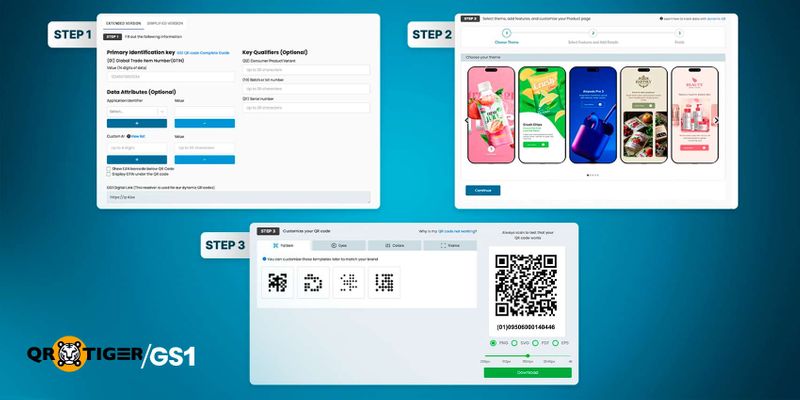
Step 1: Enter Product Information
Start by adding your product details in any of these two ways:
A. In Simplified mode, you only need to enter the GTIN 14.
B. In Extended mode, you can include extra details such as packaging date, expiry date, country of origin, batch number and serial number.
You can also choose to display the GTIN as human‑readable text (HRI) below the QR code. Once entered, the system automatically generates the correct GS1 DL URL format. It is always good to double‑check for accuracy.
Step 2: Choose Output Type and Generate
Next, decide how you want your QR code to deliver information. Here are options:
- Single URL, File, or App Store link: Quick and easy to set up.
- Link Page or Smart URL: Flexible formats that are easy to configure after testing.
- Product Page: Represents the most advanced option, where you can add text, images, videos, FAQs, reviews, and multiple links. Live previews let you see changes as you edit.
After selecting and setting up your preferred format, click ‘Generate’.
Step 3: Customize and Download
Before saving, you can adjust the design of your QR code. Modify colors or patterns to match your brand identity, or use contrasting colors to make it stand out on packaging. Once you are done with modifications, download the QR code.
Optional: Download EAN Barcodes
If your products need both 2D barcodes and the traditional format, QR TIGER/GS1 also lets you download the matching EAN barcode. This ensures your items remain compatible with retail scanners in stores that are not yet able 2 scan these next-generation barcodes.
Scanova vs QR Tiger/GS1: Comparison
| Criteria | Scanova | QR TIGER | Winner |
| Ease of use | User-friendly interface with a simple three-step process | Simple 3-step process, with more advanced options available if needed | Tie |
| Data Embedded | Allows embedding different GS1 AIs but has syntax issues during testing. | Supports multiple GS1 AIs | QR TIGER |
Link Output & Customization | URL, file, App Store, message, Landing page | URL files, branded product pages, and other options | QR TIGER |
Analytics & Tracking | Dashboard shows location, device, browser, time | Tracks total/unique scans, device, time, location | Tie |
Bulk QR Code Creation | Create up to 100 to 500 dynamic QR codes (plan-based) | Can generate up to 3,000 codes in one batch via CSV upload | QR TIGER |
QR Code Customization | Allows customizing codes with logos, images, frames, colors/patterns. May create scan issues due to verification non-compliance | Allows colors/patterns customization, while staying ISO/IEC compliant for reliable scanning | |
| Data Security | ISO/IEC 27001:2022, GDPR, SOC2 compliance | SSL, encryption, GDPR/CPPA, ISO 27001, 2FA, 24/7 monitoring | QR TIGER |
| Plans for Testing | Offers a 15-day free trial | Provides a free plan | QR TIGER |
Ease of Use
Scanova: It doesn’t need technical knowledge to follow its easy three-step setup process.
QR TIGER: A simple, step‑by‑step process built for businesses to guide them through the easy creation of GS1 DL QR codes.
Winner: Tie
Ease of use ensures even non‑technical users can generate GS1‑compliant QR codes correctly. This enables organizations to easily get started with code generation.
Data Embedded
Scanova: It can embed various GS1 AIs like GTIN, production date, due date, etc. However, during testing, there was an issue with the data attribute syntax.
QR TIGER: It allows you to embed most GS1 AIs like GTINs, packaging date, and expiry date, with correct syntax to ensure the data remains machine-readable.
Winner: QR TIGER
The ability to embed more GS1 data means QR codes can help users access richer details, improve product tracking, and help meet regulatory standards.
Link Output & Customization
Scanova: The output options supported are website URL, file, App Store, custom message, and Scanova custom landing page. Landing pages support formatting.
QR TIGER: It supports GS1‑compliant multi‑link outputs with custom domains. With structured data, the platform supports branded product pages, flexible layouts, and compliance.
Winner: QR TIGER
Link outputs and customization shape the post‑scan experience. A tailored link page can deliver product info, manuals, or promotions. Customized design keeps the brand experience consistent.
Analytics & Tracking
Scanova: The dashboard captures scan details (like location, device, browser, and time) to help businesses measure and improve marketing campaigns with verified data.
QR TIGER: Tracks total and unique scans, along with device, time, and location data. The compliance‑ready analytics support secure product monitoring.
Winner: QR TIGER
Analytics show how QR codes are used. The insights allow businesses to track engagement, refine campaigns, and meet compliance needs.
Bulk QR Code Creation
Scanova: As per your plan limit, it allows creating up to 100 or 500 dynamic QR codes at once.
QR TIGER: Enables businesses to generate up to 3,000 QR codes in a single batch via a CSV file upload. Every row contains unique data.
Winner: QR TIGER
Creating barcodes in bulk saves time. Whether it is the same product from different batches or a mix of different products, doing them one by one is slow and time-consuming for large businesses.
QR Code Customization
Scanova: The platform offers customization with logos, images, frames, and editable colors or patterns. But many visual tweaks don’t meet ISO/IEC 15426 or GS1 standards, leading to scanning issues.
QR Tiger: Supports minor customization while remaining ISO/IEC compliant. There are a few branding options to ensure reliable scanning and successful verification.
Winner: QR TIGER
Customized QR codes catch attention on packaging and stay GS1 and ISO compliant.
Data Security
Scanova: By adhering to international standards like ISO/IEC 27001:2022, GDPR, and SOC2, the platform guarantees secure, compliant, and trustworthy data management.
QR TIGER: Delivers enterprise‑grade security with SSL, password protection, encryption, ISO 27001 certification, GDPR/CPPA compliance, two‑factor authentication, and continuous 24/7 monitoring.
Winner: Tie
Strong data security is essential to protect sensitive product and customer information. The feature helps build trust and prevent risks.
Plans for Testing
Scanova: It includes a 15‑day free trial. Users get a limited time and a set of allowed features to try before upgrading.
QR TIGER: Free plan allows you to test QR codes with no time limits.
Winner: QR TIGER
Evaluating GS1 Digital Link QR codes requires careful review of features, compliance, and how well they align with your workflow. A free plan with no time limit lets businesses assess these aspects properly.

Selecting the Next-Gen QR code Tool That Matches Your Needs
When comparing Scanova vs QR TIGER / GS1 solutions, both platforms make it easier to create QR codes, but they serve different needs.
Scanova supports more than just GTIN. It can handle multiple GS1 Application Identifiers. However, during testing, issues with the data attribute syntax limited its full potential. In simple terms, some of the data may not be read correctly by machines if the structure is off.
The free trial also comes with several limits. Because of this, it can be hard to fully test the platform. Unless you are ready to move to a paid plan, you may not clearly see how it performs or what you are getting.
On the other hand, QR TIGER lets you test most of its features more freely. This helps you understand how the platform works before you commit. It is a better fit for businesses that need GS1-compliant QR codes with more detailed data, flexible outputs, and customization that passes verification.
It also handles bulk QR code creation better and supports tracking for compliance. This makes it a more suitable option for businesses preparing for GS1 Sunrise 2027.
FAQs
How do GS1-powered QR codes support product traceability?
Can GS1 Digital Link support multiple audiences with one QR code?
Why is GS1 Sunrise 2027 important for retailers?

