
What Is a GS1 Digital Link? Structure, Scanning, and How It Works

TL: DR
|
A GS1 Digital Link(DL) is a standard web address that turns identification numbers into an internet link. It lets you put the same identification code into 2D barcodes (like QR codes) and an RFID tag. while connecting that physical item directly to online information and digital services.
While it is commonly used with product identifiers like the Global Trade Item Number (GTIN), it is not limited to products.
GS1 DL also supports other GS1 identification keys, such as location codes (GLN), logistics unit codes (SSCC), returnable asset codes (GRAI), and many others. This makes it useful across retail, healthcare, logistics, manufacturing, and other industries.
Benefits of the GS1 Digital Link standard
When a barcode, RFID tag, or other data carrier containing a GS1 DL is scanned, it can:
Support interoperability: Combines a company's web domain with GS1 identifiers, such as GTINs, location codes (GLNs), logistics unit codes (SSCCs), serial numbers, and batch or lot numbers, into one standard web address. Using the GS1 standard helps different systems, organizations, and countries work together.
Enable one code for many uses: The same identification data can be used by barcode scanners, business systems, web browsers, and mobile devices.
Support conditional linking: Open different online information, such as product pages, user manuals, safety information, certificates, or promotions, based on rules set by the organization.
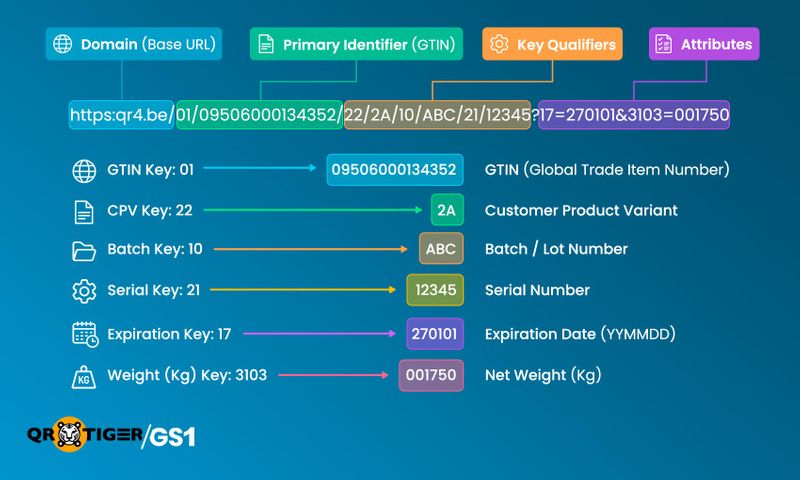
A GS1 DL is made up of several parts. Each part has a purpose and helps identify an item, location, shipment, asset, or other GS1 identification key.
After the web domain, most parts use GS1 Application Identifiers (AIs). An AI is a short number that tells systems what the data that follows means. The GS1 Application Identifier list contains over 300 data types, each with a specific meaning and value format.
Sample:
https://example.com/01/09520123456788/21/ABC123?17=270101
Domain
https://example.com
The domain is required for every GS1 Digital Link. It tells web browsers where to send the request.
Many companies use their own domain, so the LI points directly to a website they control. Others use a white-label domain provided by a trusted service, allowing them to use the service while keeping their own brand in the web address.
Primary identifier
/01/09520123456788
The primary identifier is another required field that tells what is being identified.
In this example:
01 = GTIN (Global Trade Item Number) Application Identifier + 09520123456788 = The product's GTIN
A GTIN is only one example. Other GS1 identification keys can also be used, such as:
- GLN – Location
- SSCC – Logistics unit
- GRAI – Returnable asset
- GSRN – Service relationship
- GCN – Consignment
- and many more.
Qualifiers
/21/ABC123
After the primary identifier, you can add qualifiers. These are optional and further identify the object.
The primary identifier and its qualifiers are separated using forward slashes (/). In web addresses, these are called path segments.
In this example:
21 (Serial number AI) + ABC123 (Serial number value)
Different GS1 identification keys support different qualifiers. For example:
- GTIN (01) – Consumer Product Variant (22), Batch/Lot (10), Serial Number (21), Third-Party Controlled Serialization (235)
- GLN (414) – GLN Extension (254)
- GSRN (8018) – Service Relation Instance Number (8019)
- CPID – CPID Serial Number (8011)
- SSCC, GIAI, GDTI, GINC, GSIN – No qualifiers
GTIN is unique because it supports multiple qualifiers. Many other GS1 identification keys support only one qualifier or none at all.
Attributes
?17=270101&3103=001750
Attributes are optional and describe the identified object.
Unlike the primary identifier and qualifiers, attributes are added in a query string.
- ? starts the query string.
- = separates an attribute from its value.
- & separates multiple attributes.
Here is what the sample means
17 (Expiration / Use By Date AI) + Value 270101 (YYMMDD) = Expiration date Jan 01 2027
3103 = (310 Net weight kilograms, 3 decimal places) + value 001750 = Net weight 1.750 kg
What is a GS1 Resolver?
A GS1 Resolver is a system that runs in the backend. It processes requests and decides what online information to open.
A resolver is used when someone opens the link using a web browser, smartphone, or another connected device.
When this happens, the URL is sent to the resolver. It reads the primary identifier, qualifiers, and attributes, then opens the correct web page or digital resource.
For point-of-sale (POS) scanners, a resolver is usually not needed. These scanners simply read the GS1 identification data stored in the barcode or RFID tag, such as the GTIN, and use it for checkout without going online.
Now explain what happens after someone scans the code.
Simple flow:
- Scan
- Read the Digital Link
- Resolver understands the request
- Returns the correct webpage or information
A GS1 Resolver can also perform other tasks behind the scenes. For example, it can combine information from different identification levels, return information in standard formats, and respond differently depending on how the information is requested.
These features are mainly for developers and system providers and are explained in detail in the GS1 Conformant Resolver Standard Implementation Guideline.
What are Link Types?
linkType=gs1:
By default, opening a GS1 DL takes you to its default web page. This is the page that opens when no special request is made.
Some apps can ask for a specific type of information instead. They do this by adding a link type to the web address when the barcode or RFID tag is scanned.
The printed barcode or RFID tag does not change. Only the web request changes.
For example, the printed GS1 Digital Link may be:
https://example.com/01/09520123456788
Opening the link normally takes you to the default page.
If an app wants to view allergen information, it sends this request instead:
https://example.com/01/09520123456788?linkType=gs1:allergenInfo
The resolver then checks whether an allergen information page has been set up for that identifier.
a. If it has, the resolver opens that page.
b. If it has not, the resolver returns a 404 Not Found error instead of opening the default page.
This allows one printed 2D barcode or RFID tag to automatically open the right page without changing the code. The page depends on what the app asks for and which link types have been set up.
Common GS1 Link Types
- gs1:pip – Product information page
- gs1:allergenInfo – Allergen information
- gs1:safetyInfo – Safety information
- gs1:instructions – Instructions for use
- gs1:certificateInfo – Certificates
- gs1:recipe – Recipes
- gs1:traceability – Traceability information
- gs1:sustainabilityInfo – Sustainability information
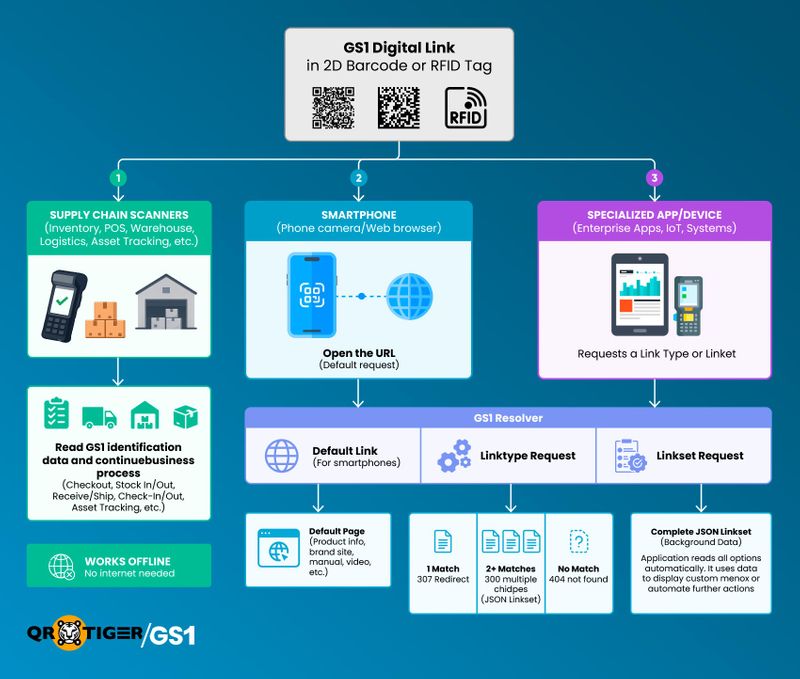
A GS1 DL can be scanned by different devices. Some read the GS1 identification data directly, while others connect to the internet to open a web page or request specific information.
The same printed code, or RFID tag, works for all of them.
Business scanners and systems
A scanner reads the GS1 DL from a QR Code, DataMatrix, RFID tag, or another data carrier.
The scanner extracts the GS1 identification data stored in the code or tag.
The business system uses that data to continue its normal process, such as:
- Product checkout (POS)
- Stock in or stock out
- Receiving or shipping
- Asset tracking
- Check-in or check-out
No internet connection or GS1 Resolver is needed because the identification data is read directly from the code or tag.
Smartphones
A user scans the GS1 Digital Link 2D barcode using a phone camera or opens it in a web browser.
The web address is sent to a GS1 Resolver.
The resolver looks for the default page that has been set up for that identifier.
The resolver redirects the phone to that page, such as a product page, user manual, or company website.
Specialized apps and devices
A specialized application scans the same printed code or tag.
- Instead of requesting the default page, the application automatically requests a Link Type or a Linkset.
- The request is sent to the GS1 Resolver.
- The resolver checks for matching resources.
For a Link Type request:
a. If no matching resource is found, the resolver returns HTTP 404 Not Found.
b. If one matching resource is found, the resolver returns HTTP 307 Temporary Redirect to that resource.
c. If two or more matching resources are found, the resolver returns HTTP 300 Multiple Choices with a JSON Linkset containing only the matching resources.
For a Linkset request:
The resolver returns the complete JSON Linkset for that identifier. A JSON Linkset is a standard file that lists all the links that have been set up for the GS1 DL, along with their Link Types.
Most people never see this file. It is usually read automatically by specialized applications running in the background.
If viewed directly, it appears as plain text with labels and web addresses, not as a normal web page. The application then uses the information in the file to display the appropriate options or content on the screen.

GS1 Digital Link vs. GS1 Element Strings
GS1 DL and GS1 Element Strings both use the same GS1 Application Identifiers to identify products, locations, logistics units, assets, and other GS1 identification keys.
The main difference is that Element Strings do not link to online information.
| Feature | GS1 Element String | GS1 Digital Link |
| Most common 2D barcode | Data Matrix | QR Code |
| Typical barcode size | Usually produces smaller codes | Usually larger in comparison because it includes a web domain* |
| Links to online information | No | Yes |
| Common applications | Healthcare, pharmaceuticals, automotive, aerospace, direct part marking, and internal business processes | Retail, consumer goods, electronic packaging, products with online information |
GS1 Digital Link and Sunrise 2027
GS1 Sunrise 2027 is a global initiative that encourages retailers to be ready to scan 2D barcodes at the point of sale (POS) by the end of 2027. The goal is to help businesses move beyond traditional 1D barcodes while supporting more product information in a single barcode.
As more retailers upgrade their POS systems, GS1 DL gives brands and manufacturers an opportunity to use the same barcode for product identification and online information.
Many organizations have already started pilot programs or rolled out GS1 Digital Link across selected product lines, showing that the standard can support both business operations and customer engagement.
At the same time, new regulations are driving the adoption of more detailed product information in some industries. As these requirements continue to grow, businesses may need to consider whether their current identification system is ready for future needs.
By 2027, the question may no longer be whether your business should support 2D barcodes. Instead, it may be whether your retail partners, distribution centers, customers, or industry regulations expect you to.
That's why many organizations are preparing today, before the transition becomes a business requirement rather than a technology choice.
Frequently Asked Questions
Why do I need a GS1 code?
A GS1 code gives your product, location, shipment, or other business item a unique identity that is recognized around the world. It helps businesses share the same information across supply chains, stores, and business systems. Many retailers and distributors also require GS1 codes before they accept products.
What is a GS1 Digital Link QR Code?
A GS1 Digital Link QR Code is a QR Code that contains GS1 identification data and can also connect users to online information, such as product pages, user manuals, safety information, or other digital content.
Are QR Codes GS1 compliant?
Not all QR Codes are GS1 compliant. A QR Code is only GS1 compliant if it follows the GS1 standard, such as using the correct GS1 Digital Link format or GS1 Element String data. The QR Code itself is just the barcode—the data inside determines whether it follows the GS1 standard.

