
Trueqrcode vs QR Tiger: GS1 Digital link QR Generation Tools

Brands today need more than just a scannable code on their packaging. They need to capture detailed inventory data while also being transparent with their customers about what's in their products and where they come from.
Traditional 1D barcodes simply can't carry enough information to meet both needs. 2D barcodes, like QR codes, can. It can store batch numbers, expiry dates, serial numbers, and more, while also linking to websites, product stories, or promotions with a single scan.
This wasn't widely adopted before because there was no global standard to make it work across systems and borders.
The GS1 Digital Link standard changed that. It gives 2D barcodes a universal language, turning product packaging into a gateway to trusted, verified information that works anywhere in the world.
Building on this, GS1 Sunrise 2027, an industry initiative whose goal is to make store checkouts capable of scanning 2D barcodes, gives brands a real opportunity to build transparent, traceable supply chains and create more meaningful connections with their customers.
Solutions like Trueqrcode and QR TIGER/GS1 help brands adapt to this upgrade. They support GS1 Digital Link(DL) QR code generation, but they differ in focus, features, and scalability.
This blog compares Trueqrcode vs QR TIGER/GS1 to simplify choosing the one that best meets your brand’s objectives.
Table of Contents
Trueqrcode Overview
Trueqrcode is a user‑friendly QR code generator that simplifies creating and managing various types of QR codes, including links, PDFs, vCards, WiFi access, and more. For this review, we will be focusing specifically on its GS1 DL QR code generation capabilities, since these are critical for businesses aiming to meet GS1 standards and prepare for initiatives like Sunrise 2027.
It supports barcode and GS1‑compliant QR codes that help businesses improve efficiency, compliance, and supply chain transparency.
Users can personalize their QR codes while ensuring they remain scannable and reliable. In addition to code generation, it supports advanced features such as scan tracking and analytics, bulk creation, and instant editing and updates.
Here are its key features:
Dynamic QR Codes
You can modify the details linked to a QR code anytime without making a new one. This makes it easy to update campaigns or quickly adjust information when required.
Advanced Analysis and Tracking
With our generator, you can track scans by number, time, and location. These insights help you fine‑tune campaigns and boost the effectiveness of your QR codes.
Bulk Creation
It allows bulk creation of several QR codes through CSV file upload.
QR Code Customization
You can design QR codes with logos, colors, shapes, frames, patterns, and eyes to match their brand identity. Many visual tweaks don’t meet ISO/IEC 15426 or GS1 standards, which can result in QR codes that fail to scan properly.
How to create GS1 DL QR codes with Trueqrcode?
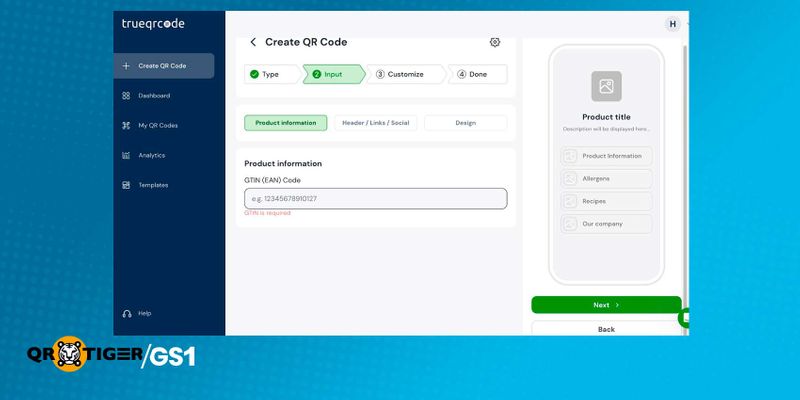
Step 1: Set Up Your Account
Visit the official website of trueqrcode and create an account by entering your email and setting up a password.
Step 2: Create Your GS1 QR Code
- Click ‘Create QR Code’.
- You will see several code types. Choose ‘Barcode QR Code (GS1 compliant)’.
- Input product GTIN (Global Trade Item Number), product header, description, product links, and social media links.
Step 3: Customize and Download
You can customize the code design by adjusting the color of background, title, and description. For the button, you can set its background, text, hover effect, and border style.
You can add a logo, frame , patterns , eye, and save the design as a template.
A preview of the generated code is shown on the left. Click ‘Next’ and then ‘Confirm and Save’. Download the code (supported formats: SVG and PNG).
QR Tiger/GS1 Overview
Easy QR Code Generation
Dynamic QR Code Options
- Single Link: Directs users to a specific URL.
- File: Instantly opens a downloadable file.
- Link Page: Works as a landing page that sorts out multiple links in one place.
- Product Page: Displays content such as text, images, videos, FAQs, reviews, and links.
- Smart URL: Adapts its destination based on language, location, or scan count.
- App Store Link: Guides users to the correct app store (Android, iOS, or Harmony).
Efficient QR Code Organization
QR Code Scan Analytics
- Total Scans: The overall number of times your code has been accessed.
- Unique Scans: The count of individual users engaging with the code.
- Device Type: Identifies whether the scan came from a phone, tablet, or other device.
- Date & Time: Finds exactly when each scan occurred.
- Location: Based on IP address (approximate) or GPS (precise). Note: GPS tracking requires explicit scanner permission.
Security
Bulk QR Code Creation
A single design template is applied across all codes for consistency. The feature is available from the second-tier plan onward. It simplifies large-scale needs like product labeling, marketing campaigns, and enterprise deployments.
QR Code Customization
How to create GS1 DL QR codes with QR Tiger?
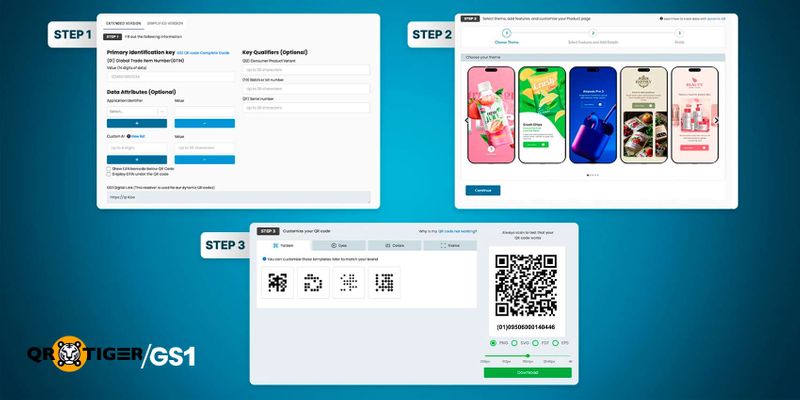
Step 1: Input Product Data
First, enter your product information. You can choose between two modes:
- Simplified Mode: Enter only the GTIN.
- Extended Mode: Enter the GTIN as well as additional product attributes you want to include.
You may also opt to display the GTIN as human‑readable text (HRI) under the QR code. Once submitted, the platform automatically generates the correct URL syntax for your reference. It’s a good practice to review the details for accuracy.
Step 2: Define Your Output and Generate
Choose what information you want your QR code to deliver. The tool provides multiple output formats:
- Single URL, File, or App Store Link: Fast and straightforward setup.
- Link Page or Smart URL: Flexible options that are easy to configure and adapt after testing.
- Product Page: It allows you to embed text, images, videos, reviews, FAQs, and multiple links in your QR codes. Live previews are available as you edit.
After choosing and customizing your preferred format, click ‘Generate’ to generate your QR code.
Step 3: Customize and Download
You can fine-tune your QR code's appearance before downloading. Adjust the patterns or try different color schemes based on your brand preferences.
Optional: Download EAN Barcodes
For products that need both 2D barcodes and traditional linear identifiers, QR TIGER lets you download the corresponding EAN barcode. This ensures your items remain compatible with retail scanners in stores that have not yet upgraded to read next-generation barcodes, maintaining smooth operations across all environments.
Trueqrcode vs QR Tiger/GS1: Comparison
Criteria | Trueqrcode | QR Tiger | Winner |
| Ease of Use | Simple four-step setup for creating QR codes. | 3 Guided steps with input validation, link to a tutorial, and more | Tie |
| Data Embedded | Supports embedding a GTIN only. | Supports multiple GS1 Application Identifiers (AIs). | QR TIGER |
| Link Output & Customization | Basic multi-link landing page. | Flexible output that can range from a single URL to a full product page with text, images, videos, and links. | QR TIGER |
| Tracking & Analytics | Tracks scans by count, time, and location. | Tracks total and unique scans, device type, time, and location. | QR TIGER |
| Bulk Creation & Management | Bulk creation through CSV upload (Limit not listed) | Bulk creation through CSV upload. up to 3,000 QR codes | Tie |
| QR Code Customization | Many styling options, like logos, colors, shapes, and patterns. Some may reduce scan reliability. | Limited styling options designed to maintain ISO/IEC scan reliability. | QR TIGER |
| Data Security | No security features are listed on their website. | Includes SSL, encryption, password protection, GDPR & CCPA readiness, ISO 27001, and 2FA. | QR TIGER |
| Testing | 10-day free trial. | Free plan available | QR TIGER |
| Scan Limits | Lower paid plans include monthly scan limits. Unlimited scans only on the highest tier. | Unlimited scans is available starting from the first paid plan. | QR TIGER |
Ease of Use
Trueqrcode: A simple, four‑step process with a user‑friendly interface and quick downloads. No technical knowledge is required.
QR Tiger: An intuitive, guided flow offering structured steps to easily create GS1‑compliant QR codes.
Winner: Tie
Ease of use is crucial because it ensures that even beginners or non‑technical staff can generate GS1‑compliant QR codes correctly. This reduces errors, speeds up adoption, and makes compliance with GS1 standards more accessible across organizations.
Data Embedded
Trueqrcode: It can only encode GTIN into QR codes.
QR Tiger: It supports embedding most GS1 AIs (such as packaging date, sell-by date, and more).
Winner: QR Tiger
More embedded product data allows granular inventory management, easier FIFO (First-In, First-Out) implementation, and stronger authenticity checks, depending on how detailed the identifiers are.
Link Output & Customization
Trueqrcode: It allows creating a simple link page output for content sharing and marketing.
QR Tiger: Supports GS1‑compliant QR codes with multi‑link options and custom domain support. It makes product pages easy to design, customize, and align with regulatory standards.
Winner: QR Tiger
This criterion matters because it defines the digital experience users get after scanning a QR code. A well‑designed link page can host multiple resources such as product details, manuals, promotions, etc. Customization ensures brand consistency.
Analytics & Tracking
Trueqrcode: Tracks scans by count, time, location, and users to help you adjust campaigns and improve QR code performance.
QR Tiger: Monitors total and unique scans, device type, date/time, and location, with compliance‑focused analytics for secure product tracking.
Winner: QR Tiger
Analytics and tracking matter because they show how QR codes are being used. This helps businesses understand customer engagement, improve marketing campaigns, and meet compliance needs in regulated industries.
Bulk Creation & Management
Trueqrcode: Supports bulk creation of several QR codes at once through CSV file upload.
QR Tiger: Allows generating up to 3,000 QR codes in a single batch using a CSV upload. Every row holds unique data.
Winner: QR Tiger
Bulk creation is important for brands managing large product ranges. It saves time, ensures consistency, and makes it easier to scale the deployment of product QR codes across thousands of items.
QR Code Customization
Trueqrcode: Lets you style QR codes with logos, colors, shapes, frames, patterns, and eyes to match your brand. However, many of these designs don’t follow ISO/IEC 15426 or GS1 standards, which can cause scanning issues.
QR Tiger: Offers basic customization like colors and patterns while staying ISO/IEC compliant. Branding options are limited to ensure codes scan reliably and pass verification checks.
Winner: QR Tiger
QR codes need to stand out on product packaging to encourage customers to scan them. At the same time, they must pass 2D barcode verification, a check that ensures the code scans reliably and won't cause delays or errors at checkout.
Data Security
Trueqrcode: No mention of data security features on their website.
QR Tiger: Supports enterprise‑grade security features like SSL (Secure Socket Layer), password protection, encryption, GDPR & CCPA readiness, ISO 27001 certification, two‑factor authentication, and 24/7 monitoring.
Winner: QR Tiger
When using third-party software to generate and manage QR codes, data security matters. These platforms handle product data, customer scan behavior, and business information, all of which need to be protected.
GDPR compliance ensures that customer data is collected, stored, and used responsibly, particularly important for brands operating in or selling to European markets. ISO 27001 certification goes a step further, showing that a provider has a formally verified system in place to manage and protect sensitive information.
Allow Testing
Trueqrcode: It offers a 10‑day free trial that gives users a short window to explore its features before upgrading.
QR Tiger: Provides a free plan that allows long‑term experimentation without time restrictions.
Winner: QR Tiger
Adopting this type of QR code is not a decision to rush. It requires careful evaluation of features, compliance, and how well a platform fits your workflow. A free plan with no time limit gives you the space to properly assess your options, unlike a free trial, which puts you under pressure to decide before you are ready.
Smart Device Scan Limits
Trueqrcode: Lower‑level plans limit how many times a QR code can be scanned by smart devices each month. Products in retail stores may receive many scans, and these limits can be reached quickly. Only the top plan allows unlimited smart device scans.
QR Tiger: All paid plans allow unlimited smart device scans, so QR codes keep working even if many people scan products.
Winner: QR Tiger
Unlimited scans keep the codes functional no matter how many people scan them, ensuring reliability across all locations and giving suppliers confidence that their codes will always work.

Choosing the Right New Generation QR Code for Your Brand
When comparing Trueqrcode vs QR TIGER/GS1, both platforms simplify QR code creation accessible, but they serve different priorities. Smartlinks is a suitable choice if your business needs a simple link page output and encodes only GTIN in QR codes.
On the other hand, QR Tiger is the stronger choice for businesses that need structured product data, regulatory compliance, and enterprise‑grade security. Its GS1‑compliant approach ensures reliable scanning, bulk creation at scale, and compliance‑ready analytics.
It is the smarter pick for businesses preparing for GS1 Sunrise 2027, when 2D barcodes will officially become the global checkout standard.
Both platforms offer a way to test before committing, whether through a free trial or a free plan. The best way to find out which works for you is to try both.
FAQ
Why is product transparency important, and how do GS1 QR codes help?
For consumers, transparency means giving clear information about the product, such as ingredients, origin, or usage instructions.For regulators, transparency focuses on compliance and traceability. Authorities may need identifiers, manufacturer details, or batch information to confirm that products follow regulations.
GS1 DL QR codes help support both. They allow companies to identify products consistently and share reliable product data when needed.
What is the GS1 Digital Link?
GS1 Digital Link is a standard that embeds granular GS1 identifiers into a structured web URL. This URL can be encoded into a 2D barcode, meaning a single scan can now both support product traceability in the supply chain and connect consumers, businesses, and regulators to relevant online content
Can a barcode be reassigned to another product?
No. Once a barcode is assigned to a product, it stays linked to that item forever. The code can’t be reused even if the particular product is no longer sold. If that same barcode is used for another product, it can create issues with stock management and compliance with industry regulations.

