
How to Track GS1 QR Codes

TL;DR
|
GS1 QR Codes can be tracked in two main ways, depending on how they are used: supply chain tracking and scan redirect analytics. Each method serves a different purpose and collects different types of data.
Supply chain tracking follows the physical movement of products, while scan redirect analytics records when users access the online content linked to the QR Code.
Supply Chain Tracking
A GS1 QR Code can store product information such as the Global Trade Item Number(GTIN), batch or lot number, expiry date, and serial number. This information follows a standard format that computers and scanners can read.Similar to a traditional 1D barcode, the product is scanned at different points in the supply chain. Each scan can be recorded in a company’s system to show where the product is, what happened to it, and how it moved from one location to another.
Supply chain tracking data is usually available in warehouse management systems (WMS), inventory systems, ERP platforms, or POS systems.
It can be done using one or both:
- On-premise systems store scan records on a company's own servers.
- Cloud-based platforms store the data online so authorized business partners can access and share product information more easily.
For this example, we will focus on item-level tracking, where each individual product has its own barcode.
1. Production and Packaging
Product labeling and quality checks: After a product is labeled on the factory line, scanners can read the GS1 QR Code to check if the code is correct and matches the right product information.Packing verification: Before products leave the factory, companies can scan items to confirm the correct product, quantity, and batch details. This helps reduce packing mistakes.
2. Distribution Center Operations
Inventory Put-Away: When products are removed from their shipping container and placed into storage locations, workers may scan the item-level GS1 QR Code or product barcode to record where each product is stored.For case-level storage, the warehouse may scan the case barcode (such as a GTIN-14) to track the location of the entire case instead.
Picking products for orders: When preparing orders for retailers or customers, workers scan products to confirm they are selecting the correct items.
Inventory checks: During stock counting, workers can scan products to compare the physical items with the inventory records in the system.
3. Retail Store Operations
Online order picking: For services like Buy Online, Pick Up In-Store (BOPIS), store employees can scan products to make sure they picked the correct item for the customer.Stock checks: Retail employees can scan products to confirm product availability and update records.
Expiry and markdown management: For products with expiry dates or batch information, employees can scan the barcode to find products that need discounts, removal, or other actions.
4. Point of Sale (POS) and Checkout
At checkout, the barcode is scanned to identify the product and get its price from the store’s system. The sale also updates the inventory by reducing the number of available items.
With extra data such as expiry dates, batch numbers, and serial numbers, stores can set up automatic actions. For example, the system can identify products that are close to expiry, apply discounts, or block expired products from being sold.
5. Returns and Recalls (Reverse Logistics)
Customer returns: When a customer returns a product, retailers can scan the barcode to identify the item, check its details, and decide what action to take.Product recalls: If a manufacturer needs to recall products from a specific batch, the barcode information can help businesses find and remove only the affected items.
Note: These examples focus on item-level product tracking, where each individual product is identified using information such as a GTIN, batch or lot number, expiry date, or serial number.
GS1 2D barcodes can also be used for shipping and logistics through the Scan4Transport standard. These processes focus on larger shipping units, such as cartons and pallets, rather than individual products.
The barcode on these shipping units usually contains an SSCC (Serial Shipping Container Code) that identifies the carton or pallet. The SSCC does not identify the individual products inside. Instead, it links to shipping information that tells systems what products are included.
Scan Redirect Analytics
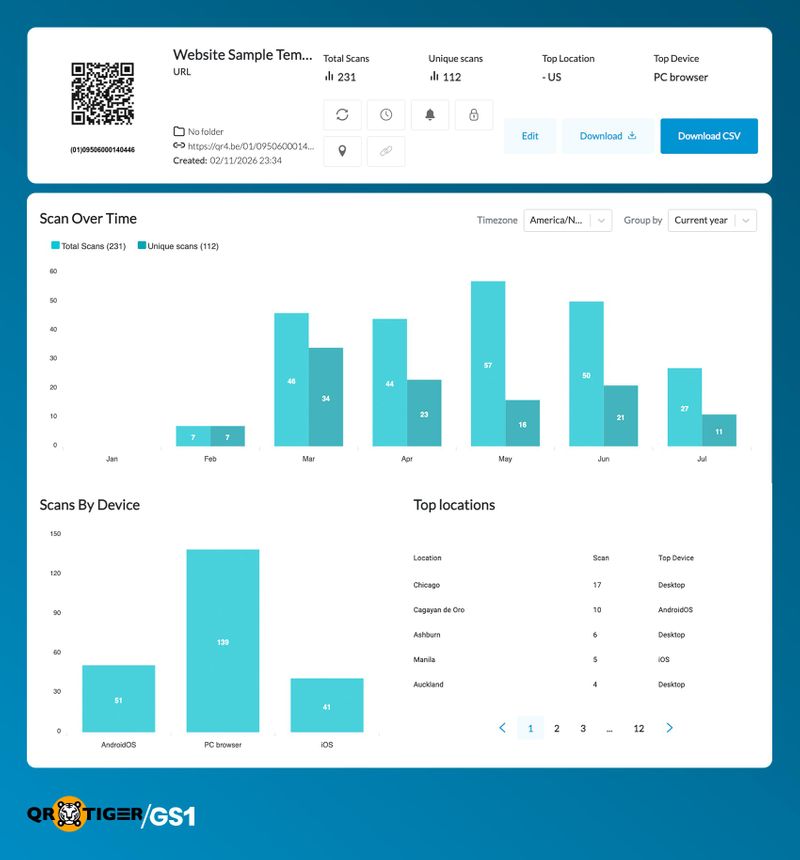
When a smart device scans a GS1 Digital Link QR Code and opens the linked URL, the scan can be recorded during the redirect process.
Before the user reaches the final destination, the request first goes to a server that manages the link. The server records basic scan information, then sends the user to the connected online content.
This happens through:
- An HTTP request is the message a device sends to a server to open a webpage.
- An HTTP redirect is the server’s response that sends the device to another webpage.
This tracking happens before the user reaches the linked content. It does not require a mobile app or any additional user action.
How does the Redirect Process Work?
A GS1 Digital Link QR Code contains a URL based on GS1 identifiers, such as a GTIN. The linked destination can be managed through a resolver or platform, allowing businesses to update the connected content without changing the printed QR Code.Scan flow: Scan QR Code → HTTP Request → Server Records Scan → 302 Redirect → Online Content
1. Scan QR Code: When a smartphone scans the QR Code, the device reads the URL stored in the code.
2. HTTP Request: The device sends a request to the server to access the link. This tells the server that the QR Code has been scanned.
3. Server Records Scan: The server can capture basic scan details, such as the scan time, device information, and other available data.
4. 302 Redirect: The server then sends the user to the connected online content using a 302 redirect. A 302 redirect temporarily sends visitors to another URL while allowing the server to record the scan before the user continues.
What information is recorded?
Because the server receives the HTTP request, it can record basic information about the scan, including:1. When: The date and time when the QR Code was accessed.
2. Where: The server can record the scan location in two ways. By default, it can estimate a general location using the device’s IP address, usually at the city or region level. If the user allows location access through the browser or application, GPS data may provide a more precise location
3. Device: The server can identify basic device information, such as whether the scan came from an iPhone, Android phone, or another device.
4. Browser: The server may identify the browser or scanning tool used to open the link.
5. Scan count: The system can record the total number of scans. Some platforms can estimate repeat visits using signals such as cookies, IP addresses, or device information. However, these estimates may not always accurately identify the same user.
Redirect analytics are available in the resolver or platform that manages the GS1 Digital Link URL. This can be a system built by the company or third-party service platforms.
Businesses can also use tools such as Google Analytics to understand what users do after they reach the linked website.
Realities and Issues of Location Data Via Redirect Analytics
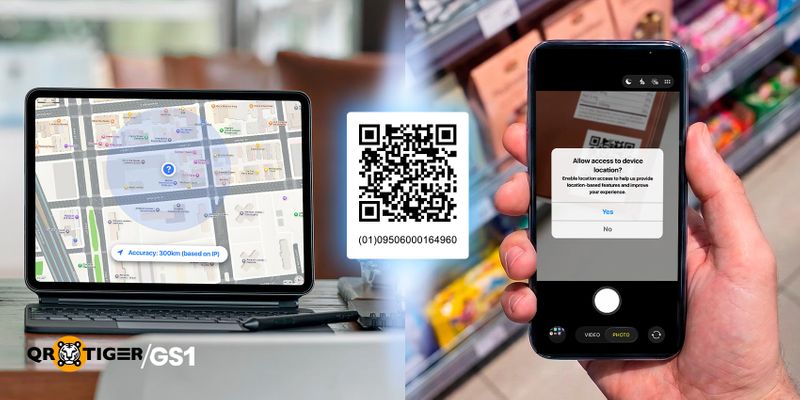
Many brands expect redirect analytics to show the exact location where a GS1 QR Code was scanned. In reality, location data is not always exact. Understanding these limits helps you know what location data can and cannot tell you.
Location based on IP
IP-based location is an estimate based on the internet connection used during the scan. It does not directly identify the user’s exact physical location.The location shown by an IP address may represent the network connection point rather than where the QR Code was actually scanned. In some cases, the estimated location can be several or even hundreds of miles from the actual scan location.
Common reasons why the location may be inaccurate include:
Shared IP addresses: Many internet providers, especially mobile carriers such as T-Mobile and Verizon, share public IP addresses among multiple users. A scan may appear to come from the carrier’s network location instead of the user’s actual location.
Network routing: Internet traffic is often routed through larger network hubs or data centers before reaching a website. For example, satellite internet services such as Starlink may show the location of a ground station rather than the user’s actual location.
Outdated location databases: IP location services rely on databases that map IP addresses to estimated locations. If an IP address is moved or reused, the database may show an older or incorrect location until it is updated.
Public Wi-Fi networks: A scan made using Wi-Fi in a café, hotel, or store may appear to come from the business’s internet connection or the provider’s network location instead of the actual scan location.
Location based on GPS
GPS-based location can provide more accurate data than IP-based location, but it requires the user’s permission.Privacy laws such as GDPR in Europe and other privacy rules, including California’s CCPA, treat precise location data as sensitive information. Companies that collect this data must explain why they need it and make sure it is stored, protected, and removed properly.
Because of this, websites and apps must ask for user permission before accessing their GPS location.
However, this permission request can affect the scanning experience. When someone scans a GS1 QR Code, they usually expect quick access to useful information, such as product details, videos, or instructions. A location request may make users question why their location is needed.
Note: Even if the user does not allow GPS access, the scan is still recorded. This is because the QR Code connects to the server before the browser asks for location permission.
The system can still save basic scan data, such as the scan time, device information, and the estimated location from the IP address. Only the GPS location is not available.
You may think this is enough because the scan is still recorded. However, the main reason for linking a GS1 QR Code to a website is to encourage customer engagement. If asking for GPS permission causes users to leave the page or refuse access, it defeats that purpose.
This creates a trade-off:
| Feature /Metric | IP-Based Location | GPS-Based Location |
| User Permission | [Upside] No permission needed | [Downside] User must approve a pop-up |
| User Experience | [Upside] Smooth and fast | [Downside] Location request may scare users and will close the page |
| Accuracy | [Downside] Broad area (City/Region) Can be off by miles | [Upside] Highly accurate coordinates Exact physical location (longitude and latitude) |
Do supply chain scans appear in redirect analytics?.
A supply chain scan only appears in redirect analytics if the scanning device connects to the URL and sends an HTTP request.Basic 1D and 2D barcode scanners: Many warehouse scanners only read the barcode data and send it to inventory software. They do not open the URL or connect to the internet, so no redirect analytics are recorded.
Connected smart scanners: Some modern warehouse devices have internet access and software that can open or check URLs. If they send an HTTP request to the GS1 Digital Link URL, that activity can be recorded as an online scan.

How to Make the Most of Tracked GS1 QR Code Data
Tracked GS1 QR code data answers different questions. Supply chain data shows where products have been and helps improve inventory, traceability, and recalls. Redirect analytics shows how customers interact with the online content after scanning the GS1 QR Code.Looking at both data sets together gives businesses a more complete picture.
For example, if a product sells well but receives very few scans, the online content or call to action may need improvement.
If scans are high but sales are low in a certain area, it may point to pricing, product availability, or marketing issues.
While location data from redirect analytics is not always exact, it can still reveal useful trends over time that help businesses make better decisions.
Questions and Answers
Can I scan a barcode to see where something came from?
It depends on the barcode and the system behind it. A standard 1D barcode usually identifies only the product. A GS1 QR Code can also link to product information or connect to a barcode tracking system that shows where the product has been.What is the difference between a QR Code and a barcode?
A barcode (1D barcode) stores a small amount of product information. A QR Code (2D barcode) can store much more data and can also link to online content. A GS1 QR Code combines product identification with web links in a single barcode.Is a barcode number a tracking number?
A barcode number is an identifier, not a tracking number.- GTIN → Product identifier
- SSCC → Logistics unit identifier
- Carrier tracking number → Shipment identifier assigned by the carrier

DISCLAIMER: We acknowledge that GS1, as well as the materials, proprietary items, and all related patents, copyright, trademark, and other intellectual property (collectively, “intellectual property”) relating to its use, are the property of GS1 Global, and that our use of the same shall be in accordance with the conditions provided by GS1 Global.
