
A Guide to Implementing GS1 2D Barcodes in Retail

Implementing GS1 2D Barcode in retail opens the door to smarter inventory management, faster recalls, stronger compliance, and richer connections with shoppers.
The barcode has been a fixture of retail for over five decades. It has survived countless waves of technological change, quietly doing its job at the checkout while the rest of the industry transformed around it.
But the familiar black-and-white stripes that have defined product scanning since the 1970s are finally meeting their match and the upgrade is long overdue.
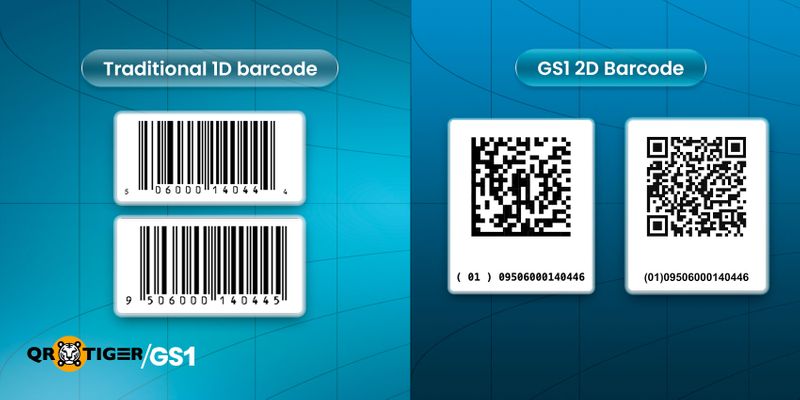
GS1 2D barcodes are redefining what a barcode can do. Where a traditional barcode tells your systems what a product is, a 2D barcode can tell them when it expires, which batch it came from, and, for some codes, where to find more information about it all from a single scan.
What is a GS1 2D Barcode?
It is a machine-readable 2-dimensional symbol that can contain one or more product identifiers and data, according to GS1's globally recognized standards.
Unlike traditional retail barcodes that usually store just one product ID, 2D barcodes can hold more details in a small space. This makes it easier to capture and share product information across the supply chain.
There are two primary types used in retail:
- GS1 DataMatrix looks like a small square made of tightly packed black and white cells, with solid lines forming an L-shape on two sides. It is commonly used in healthcare and pharmaceutical products, where regulations require traceability and package space is limited.
- GS1 QR Code looks like a square with three larger squares in its corners. It is widely recognized and can be scanned by most smartphone cameras, making it ideal for retail checkout and consumer interaction.
Both barcode types can carry data in two ways.
1. Encoding GS1 element strings and Application Identifiers (AIs) that allow retail systems to capture structured data such as GTINs, expiry dates, and batch numbers at the point of scan.
2. GS1 Digital Link, a web-based standard that transforms the same data in an element string into a URL, connecting consumers and systems alike to online product content, regulatory disclosures, and sustainability information.
Why Retail Needs 2D Barcodes
Implementing GS1 2D Barcodes is a fundamental change in what the barcode can do for a retail business. Here is why it matters:
- Transparency and traceability: By storing details like expiry dates and batch numbers in the barcode, retailers can track product freshness, apply discounts based on dates, and handle recalls more accurately by removing only the affected items instead of the entire product line.
- Regulatory compliance: Governments and industry bodies in multiple markets are introducing requirements for serialization and traceability data across categories, including food, pharmaceuticals, and cosmetics.
- Consumer engagement: For retailers with store brand or exclusive products, a GS1 Digital Link-enabled barcode can connect shoppers to product origin stories, allergen information, sustainability credentials, and promotional content directly from the product packaging.
- Cost and ROI: Although implementing these standards requires upfront investment in hardware, software, and staff training, the benefits are significant. Businesses can reduce product waste, carry out faster and more accurate product recalls, lower compliance costs, and gain better visibility of their inventory. Over time, these improvements deliver a strong return on investment.
- The GS1 Sunrise 2027: GS1 has set 2027 as the global target date by which retail point-of-sale systems should be capable of reading and processing 2D barcodes. This is not a regulatory hard deadline in every market, but it signals an industry-wide shift that is already underway.
Now that you know the basics, here is what you should do to implement 2D barcodes.
Retail System and Process Upgrades
Implementing GS1 2D barcodes touches every layer of a retail operation, from the scanner on the shop floor to the back-end systems that manage inventory, compliance, and supplier data.
This section walks through the four key steps to get your systems and people ready, in the order that makes the most operational sense.
Step 1: Assessment and Planning
Before buying any hardware or updating your software, take time to thoroughly assess your current operations. Rushing into implementation without knowing where you stand today is one of the most common and costly mistakes retailers make.
Audit your current POS scanners and software: Check which scanner models you currently use in your stores and whether they can read GS1 DataMatrix and QR Codes. Many older scanners can only read traditional 1D barcodes and may need to be replaced or upgraded with new firmware.
Identify capability gaps: Beyond the scanner itself, assess whether your POS software can parse/read GS1 element strings and Application Identifiers. Even if a scanner can physically read a 2D code, it won’t help much if your backend system cannot interpret the information it contains.
Define your pilot scope: Instead of trying to roll out the system across all stores at once, start with a small pilot. Choose a limited number of stores, product categories, and SKUs. A smaller, focused pilot helps you discover problems early, improve your processes, and build confidence within the team before expanding to the rest of the business.
Engage suppliers and IT teams early: Implementing 2D barcodes is not something a retailer can do alone. Suppliers must be ready to create compliant barcodes, and your IT team needs to be involved from the beginning to check integration needs and manage system requirements.
Estimate overall costs: Create a realistic budget that includes all necessary costs: hardware (scanner replacements or upgrades), software licenses and development, staff training, and the time required to test system integrations. Don’t forget to also include ongoing costs for maintaining good data quality and ensuring suppliers continue to meet the requirements.
Step 2: Hardware and Software Readiness
Once you understand your current gaps, the next step is to fix them. This means upgrading your scanners and ensuring that every system that handles scan data can properly read and process the information from 2D barcodes.
- Upgrade scanners to read both 1D and 2D barcodes: Modern area-image scanners can read all standard GS1 barcode types, including EAN/UPC, DataMatrix, and QR Codes. When selecting new scanners, confirm compatibility with GS1-formatted 2D symbols, specifically not just generic QR Code reading.
- Update POS software to parse GS1 element strings and Application Identifiers: Your software needs to know how to interpret the structured data inside a 2D barcode. This means recognizing AIs such as (01) for GTIN, (17) for expiry date, and (10) for batch or lot number, and routing each data element to the correct field in your system.
- Configure systems to capture and store richer data: Once the software can parse the data, it needs somewhere to put it. Configure your inventory, receiving, and compliance systems to accept and store expiry dates, batch numbers, and serial numbers as discrete fields, not just free text.
- Connect 2D barcode data with your inventory, recall, and compliance systems. The real value comes when this data flows through your daily operations. Make sure that expiry dates automatically trigger markdowns or product removal, batch numbers are linked to your recall system, and serialization data feeds into your compliance reports."
- Before launching, thoroughly test the full integration with your back-end systems. Make sure that data scanned at the checkout or receiving dock appears correctly in your warehouse management system, ERP, and compliance platforms. Also test difficult cases, such as barcodes with extra information and barcodes that contain Digital Link URLs.
Step 3: Process and People Upgrades
Technology alone does not deliver a successful implementation. The processes and people that interact with your systems every day need to be aligned with what the new capabilities make possible and what they now require.
- Update your receiving and stock management procedures. 2D barcodes allow expiry dates and batch numbers to be captured automatically when products arrive. Instead of typing them manually, the system can record them directly. Make sure your procedures are updated and that this data is actually used for stock rotation, markdowns, and product recalls.
- Train store staff on new scanning workflows and exception handling: Staff need to understand what has changed at the checkout and receiving areas, what to do when a barcode does not scan correctly, and how to escalate issues. Training should be practical and scenario-based, not just theoretical.
- Update checkout and customer service processes where relevant: In some cases, 2D barcode data will surface information at the POS that was not previously visible such as an item that is past its sell-by date. Ensure that checkout staff know how to handle these alerts and that the customer experience remains smooth.
- Work closely with your suppliers on data quality and barcode standards. Your success depends heavily on the quality of barcodes your suppliers provide. Set clear expectations for data quality, share GS1 specifications with them, and establish a process to identify and fix non-compliant barcodes. Engaging your local GS1 member organisation can also help suppliers who are new to 2D barcodes to get up to speed quickly.
Step 4: Pilots, Testing, and Rollout
A structured pilot is where plans are tested in real conditions. It helps confirm assumptions, find issues early, and gather proof before a full rollout.
- Run a small pilot with selected products and stores: Choose a setup that reflects your wider business but is still easy to manage. Include different store types, products, and suppliers. Start with items where 2D barcode data gives clear benefits, such as fresh goods or regulated products.
- Set success measures before starting: Decide what “success” means before the pilot begins. This can include scan success rates, data accuracy, system performance, and staff feedback after training.
- Set clear stop or pause rules: Agree early on when the pilot should be paused or stopped. For example, if scan errors go beyond an acceptable level or system issues cannot be fixed quickly. This avoids confusion later.
- Move from pilot to full rollout in stages: Use what you learn to improve the process before expanding. Roll out step by step by store group, region, or product type. This helps control risk while keeping progress steady. Track what worked and what needs fixing as you expand.
Additional Steps for Retailers with Store Brand Products
If your retail business sells store-brand or private-label products, you have extra responsibilities but also bigger opportunities.
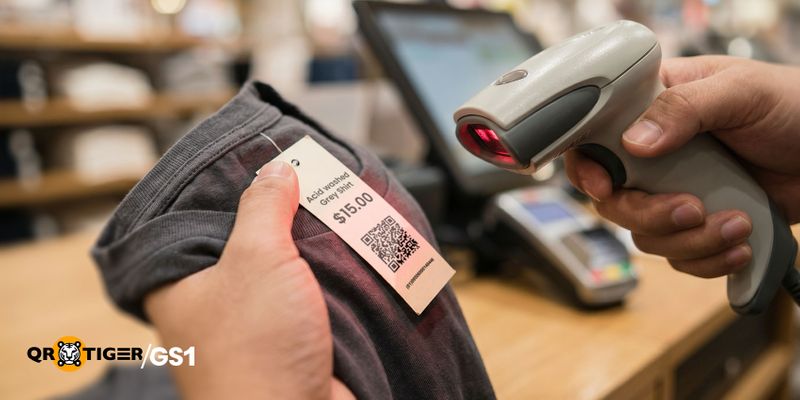
Since you own the product, you also own the barcode. This means you get to decide what information to include, which type of barcode to use, and how it connects to digital content.
When done properly, this gives you a strong competitive advantage over other retailers.
Step 1: GTIN Assignment and Barcode Generation
Every store brand product needs a unique Global Trade Item Number (GTIN) before a barcode can be generated. If your business is not already a GS1 member, this is the starting point GS1 membership provides access to a company prefix from which your GTINs are derived, ensuring that your product identifiers are globally unique and recognized across retail systems worldwide.
Before generating any barcode, it is worth taking a step back to clarify what you need the barcode to do. The answer will shape which barcode type is the right fit:
- If your primary goal is operational, capturing expiry dates, batch numbers, and serial numbers at the POS and receiving dock, then GS1 DataMatrix is typically the better choice. It is compact, high-density, and well-suited to smaller packaging formats.
- If you also want the barcode to serve as a consumer-facing touchpoint linking shoppers to product information, sustainability credentials, or promotions via their smartphone, a GS1 QR Code encoding a GS1 Digital Link is the more versatile option. It handles both operational scanning and consumer engagement from a single symbol.
- Some retailers choose to use both: a GS1 DataMatrix for operational scanning on products where space is limited, and a GS1 QR Code on products where consumer engagement is a priority.
Once you have defined your goals and selected your barcode type, generate the barcode using GS1-compliant tools and encode all relevant data elements at minimum the GTIN, and additionally the expiry date, batch or lot number, and serial number where your operations or regulations require them.
- Assign a unique GTIN: to each store brand product variant.
- Identify your implementation goals: and select the appropriate 2D barcode type GS1 DataMatrix for operational use, GS1 QR Code for Digital Link and consumer engagement, or both where needed.
- Generate the barcode: using compliant barcode generation software or your GS1 member organisation's tools.
- Encode all relevant data: expiry date (AI 17), batch or lot number (AI 10), and serial number (AI 21) where applicable.
Step 2 (Optional): Linking to Online Content
This step applies only if you are using GS1 Digital Link to encode your product data.
This could include full product information pages, ingredient and allergen disclosures, sustainability and sourcing stories, promotional offers, or regulatory documentation. The content you link to should reflect what matters most to your shoppers and what your regulatory environment requires.
Step 3: Print and Placement Standards
A barcode that cannot be scanned reliably is worse than no barcode at all; it creates friction at the checkout, errors in your systems, and a poor experience for whoever is on the other end of the scan.
- Ensure correct placement on packaging: GS1 publishes detailed guidelines on where barcodes should be positioned on different packaging types and formats. Follow these to ensure that the barcode is accessible to scanners at every point in the supply chain from the warehouse to the checkout to the consumer's phone.
- Meet print quality requirements for reliable scanning: Barcode print quality must meet GS1’s official grading standards. Common problems like low-contrast printing, distorted barcodes, or symbols that are too small often cause scanning failures.
To confirm quality, barcodes should be tested using a barcode verifier or a professional barcode verification service that measures the symbol against GS1 grading requirements before full production begins.
- Include human-readable interpretation (HRI) text: HRI is the human-readable version of the encoded data printed alongside the barcode for example, the GTIN number, expiry date, and batch number in plain text. This allows staff and consumers to read and verify the data without a scanner, and is a GS1 requirement for many product categories.
Raising the Standard for Retail Barcode Systems
Implementing GS1 2D Barcodes is one of the most significant changes to hit retail infrastructure in a generation and the window to prepare is narrowing.
For retailers with large store networks, complex supplier bases, and legacy POS infrastructure, the planning, procurement, and rollout process takes time. The retailers who act now are the ones who will navigate the transition on their own terms.
The good news is that you do not need to have everything figured out before you begin. The most important first step is simply to start: audit where you stand today, identify your gaps, define a pilot scope, and get your IT and supplier teams in the room.
Every part of this guide is designed to be tackled in stages and a well-run pilot with a handful of SKUs will teach you more about your readiness than any planning document.
For retailers willing to invest in the transition properly, they are a foundation for smarter operations, stronger traceability, better supplier relationships, and for those with store brand products a new channel for consumer engagement. The barcode has been doing its job quietly for fifty years. It is time to ask more of it.
 FAQs
FAQs
Can my existing POS scanner read GS1 DataMatrix or QR Codes?
It depends on your scanner type. Older laser scanners only read 1D barcodes like EAN or UPC. Camera-based scanners can read 1D and 2D codes such as GS1 DataMatrix and GS1 QR Codes. Check specs or ask your supplier.
Do I need a GS1 license to use 2D barcodes?
Retailers scanning supplier barcodes do not need a GS1 license. Brands, manufacturers, and suppliers are responsible for their own registration and product numbers.
If you create barcodes for your own products, such as store brands, you need a GS1 membership. This includes a licensed company prefix, which you use to create unique GTINs and generate your own barcodes for your products.
How is it different from a regular QR Code?
A normal QR Code can hold any text or link. A GS1 QR Code follows a standard format so retail systems can read meaning like product ID, expiry date, and batch number. Regular QR codes are for general use. GS1 QR codes are structured for retail systems.

DISCLAIMER: We acknowledge that GS1, as well as the materials, proprietary items, and all related patents, copyright, trademark, and other intellectual property (collectively, “intellectual property”) relating to its use, are the property of GS1 Global, and that our use of the same shall be in accordance with the conditions provided by GS1 Global.
